Every business problem is different. That's the first thing you learn when you move from building AI demos to deploying AI agents that solve real problems at scale.
I've spent the last couple of years building multi-agent systems at a large enterprise, and the pattern is always the same. You build an agent system to solve a specific problem. It works. You ship it. Then the next problem shows up, and you realize half the agents you need already exist, trapped inside the orchestration you built for the last problem.
The Problem: Agents Are Reusable, Orchestrations Are Not
Let me make this concrete. Say you're building a customer support automation system. You wire up a ticket classifier agent, a knowledge base search agent, a response generator, and a tone checker. You connect them in a LangGraph Graph, deploy it, and it works.
Then someone wants a sales enablement assistant. Then an IT helpdesk bot. Both need the KB Search and Response Generator you already built. But those agents are wired into the support system's Graph. So you copy-paste, rewire, redeploy. Every time.
Support System:   [Ticket Classifier] → [KB Search] → [Response Generator] → [Tone Checker]
Sales Assistant:  [Product Spec Fetcher] → [KB Search] → [Comparison Builder] → [Response Generator]
IT Helpdesk:      [Ticket Classifier] → [KB Search] → [System Diagnostics] → [Response Generator]
Three systems. Three orchestration layers. Three copies of KB Search. Three copies of Response Generator. All maintained independently. And it gets worse when teams use different frameworks: LangGraph here, CrewAI there, Agno over there. None of these agents can talk to each other. You end up building islands.
This is the orchestration tax that every enterprise AI team is paying right now. Not the cost of building agents (that part is getting easier every month) but the cost of wiring them together, over and over, for every new problem.
The Vision: Agents That Find Each Other
I know what you're thinking: this is just microservices with extra steps. And you're partially right. But there's a critical difference: microservices have static APIs that humans design. Agent systems need dynamic composition where the planner itself decides which agents to call, in what order, based on the problem at hand. No human writes a new Graph. The system figures it out.
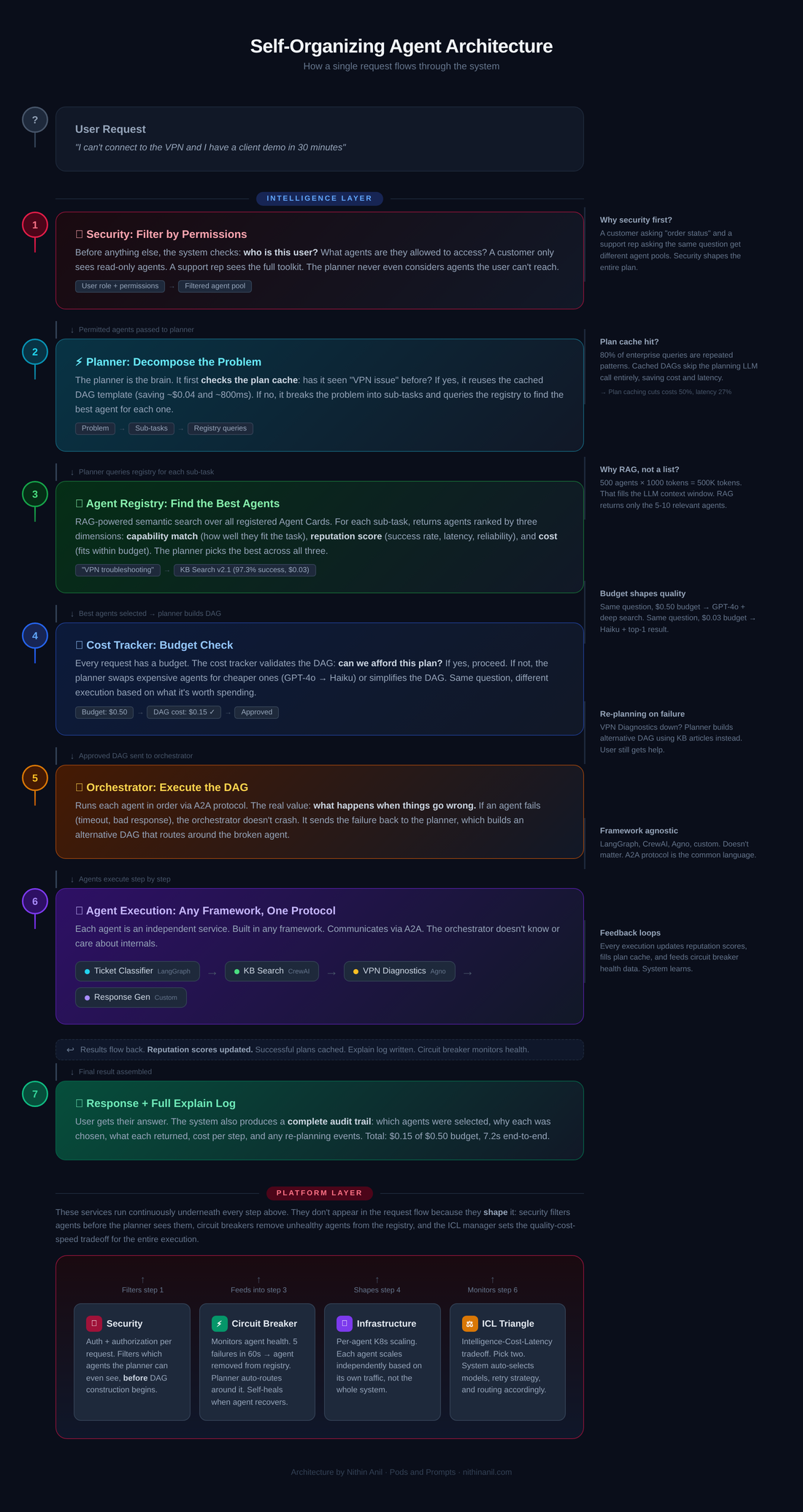
Here's the architecture I'm proposing. It has two layers: an Intelligence Layer that handles the "thinking" and a Platform Layer that handles the "running."
┌─────────────────────────────────────────────────────────────────────────┐
│                          USER REQUEST                                    │
│              "I can't connect to the VPN and I have                      │
│                  a client demo in 30 minutes"                            │
└──────────────────────────┬──────────────────────────────────────────────┘
                           │
┌──────────────────────────▼──────────────────────────────────────────────┐
│                                                                          │
│                       INTELLIGENCE LAYER                                 │
│                                                                          │
│  ┌──────────────┐    ┌───────────────────┐    ┌───────────────────┐     │
│  │   PLANNER    │───▶│  AGENT REGISTRY   │    │   COST TRACKER    │     │
│  │              │    │   (RAG-based)     │    │                   │     │
│  │ Decomposes   │◀───│                   │    │ Budget: $0.50     │     │
│  │ problem into │    │ ┌───────────────┐ │    │ Spent:  $0.00     │     │
│  │ sub-tasks,   │    │ │ Vector Index  │ │    │ Left:   $0.50     │     │
│  │ builds Graph   │    │ │ + Reputation  │ │    │                   │     │
│  │              │◀───│ │ Scores        │ │    │ Tracks per-agent  │     │
│  │ Checks plan  │    │ └───────────────┘ │    │ cost and adjusts  │     │
│  │ cache first  │───▶│                   │    │ model selection    │     │
│  │              │    │ Returns best-fit  │    │                   │     │
│  └──────┬───────┘    │ agents + scores   │    └───────────────────┘     │
│         │            └───────────────────┘                              │
│         ▼                                                               │
│  ┌──────────────┐    ┌───────────────────┐                              │
│  │ ORCHESTRATOR │    │   EXPLAIN LOG     │                              │
│  │              │───▶│                   │                              │
│  │ Executes Graph │    │ Full audit trail: │                              │
│  │ Re-plans on  │    │ which agents, why │                              │
│  │ failure      │    │ chosen, what each │                              │
│  └──────┬───────┘    │ returned, cost    │                              │
│         │            └───────────────────┘                              │
│         ▼            A2A Protocol (standard communication)              │
│  ┌──────────┐  ┌──────────┐  ┌───────────┐  ┌──────────────┐          │
│  │ Ticket   │  │    KB    │  │   VPN     │  │  Response    │          │
│  │Classifier│─▶│  Search  │─▶│Diagnostics│─▶│  Generator   │          │
│  │(LangGraph)│ │ (CrewAI) │  │  (Agno)   │  │  (Custom)    │          │
│  └──────────┘  └──────────┘  └───────────┘  └──────────────┘          │
│   Any framework. Each agent is independent. Communicates via A2A.      │
│                                                                          │
└──────────────────────────────────────────────────────────────────────────┘
                           │
┌──────────────────────────▼──────────────────────────────────────────────┐
│                                                                          │
│                        PLATFORM LAYER                                    │
│                                                                          │
│  ┌────────────────────┐ ┌────────────────┐ ┌────────────────────────┐   │
│  │  INFRASTRUCTURE    │ │   SECURITY     │ │  INTELLIGENCE-COST-    │   │
│  │  + CIRCUIT BREAKER │ │                │ │  LATENCY MANAGER       │   │
│  │                    │ │ Auth + Authz   │ │                        │   │
│  │ K8s per-agent      │ │ per request.   │ │ Pick two:              │   │
│  │ scaling. Circuit   │ │ Planner only   │ │  Smart + Fast = $$$    │   │
│  │ breaker marks      │ │ selects what   │ │  Smart + Cheap = Slow  │   │
│  │ unhealthy agents.  │ │ user can       │ │  Fast + Cheap = Dumb   │   │
│  │ Planner routes     │ │ access.        │ │                        │   │
│  │ around them.       │ │                │ │                        │   │
│  └────────────────────┘ └────────────────┘ └────────────────────────┘   │
│                                                                          │
└──────────────────────────────────────────────────────────────────────────┘
Let me walk through each component.
Intelligence Layer
1. Agents as Independent Services
This is the foundation. Every agent is a standalone service that does one thing well. Think of it like a microservice, but for intelligence. It takes an input, processes it, returns an output. It doesn't know or care what called it.
The KB Search agent from our example? Today it's a node inside the support system's LangGraph Graph. It can only be invoked through that specific graph. But if we extract it as an independent service, any system can call it. The sales assistant, the IT helpdesk, the onboarding bot, anything.
Teams are free to build agents in whatever framework fits their use case. One team uses LangGraph because they need stateful workflows. Another uses CrewAI for role-based delegation. A third uses Agno for lightweight async patterns. It doesn't matter. The only requirement is that every agent speaks the same communication protocol.
Each agent is also responsible for its own connection to data. It connects to whatever databases, APIs, or business systems it needs, either through MCP (Anthropic's Model Context Protocol) or direct integration. It manages its own authentication to those systems. The orchestrator doesn't need to know how the KB Search agent finds articles. It just needs to know that it can.
2. A2A Protocol for Communication
This is where the "social network" part comes in. For agents built in different frameworks to work together, they need a common language. Stop building custom communication protocols between your agents. Google's A2A protocol and Anthropic's MCP will be commodity infrastructure within 18 months. A2A already has 150+ industry partners [14]. MCP is the de facto standard for agent-to-tool communication. Betting against these protocols is like building your own HTTP in 2005.
The key concept in A2A is the Agent Card. It's a JSON document that acts like an agent's profile in the network, describing who it is, what it can do, and how to reach it. Here's what the KB Search agent's card might look like:
{
  "name": "kb-search-agent",
  "description": "Searches knowledge bases, returns relevant articles with confidence scores",
  "skills": [
    {
      "id": "semantic-search",
      "description": "Find relevant articles for a given question or problem description",
      "examples": [
        "How do I reset my VPN credentials?",
        "What is our return policy for enterprise contracts?"
      ]
    }
  ],
  "endpoint": "https://agents.internal/kb-search/a2a",
  "authentication": { "scheme": "OAuth2" }
}
When the CrewAI-based sales assistant needs to search the knowledge base, it sends a standard A2A request to the LangGraph-based KB Search agent. Neither knows anything about the other's internals. They just exchange messages in a format both understand.
The value isn't in the protocol itself. A2A will be a commodity. The value is in what you build on top: the registry that indexes these Agent Cards, the planner that selects the right agents, and the budget system that controls spending.
3. RAG-Powered Agent Registry with Reputation Scores
When an agent comes online, it registers itself with a central registry. It provides its Agent Card (capabilities, examples, performance characteristics, cost per call). The registry indexes these capability descriptions in a vector database.
This is what makes dynamic composition possible. The planner doesn't have a hardcoded list of agents. It discovers them through semantic search, similar to how recent work on tool selection uses RAG to match the right tool to the task at scale [9].
Why RAG instead of just passing the full list of agents to the planner? Scale. When you have 10 agents, you could stuff all their descriptions into the planner's context and let it pick. But what happens when you have 200 agents? Or 500? Each Agent Card with its capabilities, examples, and metadata might be 500-1000 tokens. Five hundred agents means 250,000 to 500,000 tokens just to describe the available agents, before the planner even starts thinking about the problem. That fills up the LLM's context window, costs a fortune on every request, and drowns the planner in irrelevant options. With RAG, the planner only sees the 5-10 agents that are actually relevant to the current request. The vector search does the filtering, not the LLM's attention mechanism.
But capability matching alone isn't enough. Two agents might both claim they can "search knowledge bases," but one has a 97% success rate and the other fails 30% of the time. The registry needs to know the difference. That's where reputation scores come in. Research shows that credibility scoring, where agents earn trust through successful task completion, significantly improves system reliability [10].
Every time an agent is used, the system records the outcome: did it succeed? How long did it take? Did the orchestrator have to re-plan because this agent failed? Over time, each agent builds a live performance profile:
KB Search Agent (v2.1)
├── Capability match:     semantic search over internal docs
├── Success rate:         97.3% (last 30 days, 14,200 calls)
├── Avg latency:          340ms
├── Avg cost per call:    $0.03
├── Failure rate:         2.7%
└── Last failure:         2 hours ago (timeout, recovered)

KB Search Agent (v1.8 - legacy)
├── Capability match:     keyword search over internal docs
├── Success rate:         82.1% (last 30 days, 3,100 calls)
├── Avg latency:          890ms
├── Avg cost per call:    $0.02
├── Failure rate:         17.9%
└── Last failure:         12 minutes ago (bad response format)
When the planner queries the registry, it gets back agents ranked by three dimensions: how well they match the task (semantic similarity), how reliably they perform (reputation score), and how much they cost (budget fit). The planner picks the agent that scores best across all three, not just the one with the closest capability description.
Here's an example. Someone wants a new onboarding assistant for new hires. The planner receives the request: "Answer common questions new employees have about benefits, IT setup, and company policies." It queries the registry:
Query: "agent that can answer questions about company policies"
Result: KB Search Agent v2.1 (similarity: 0.94, success: 97.3%, cost: $0.03)  ← selected
        KB Search Agent v1.8 (similarity: 0.91, success: 82.1%, cost: $0.02)  ← skipped

Query: "agent that can walk users through IT setup steps"
Result: System Diagnostics Agent (similarity: 0.89, success: 94.7%, cost: $0.05)

Query: "agent that can draft friendly, conversational responses"
Result: Response Generator (similarity: 0.92, success: 98.1%, cost: $0.04)
The planner assembles the team on the fly. No one had to build an "onboarding orchestration layer." No one had to write a new Graph. The system composed it from agents that already existed in the registry, picking the most reliable ones.
This also means that when someone deploys a new agent (say, a Benefits FAQ agent), every existing system can immediately discover and use it. The new agent registers, its capabilities get indexed, and the next time someone asks a benefits question, the planner finds it. Zero integration work. The new agent starts with a neutral reputation score and builds credibility through successful executions.
4. Intelligent Planning Layer with Graph Caching
The planner is the brain of the system. Given a user's request and the registry of available agents, it does three things: breaks the problem into sub-tasks, queries the registry to find the best agent for each sub-task, and builds a Graph to solve the problem.
For a support ticket like "I can't connect to the VPN and I have a client demo in 30 minutes", the planner constructs:
classify_urgency("VPN issue, time-sensitive")
       │
       ▼
search_kb("VPN troubleshooting")
       │
       ▼
run_diagnostics("VPN service status")
       │
       ▼
generate_response(context + diagnostic_results)
       │
       ▼
check_tone("empathetic + urgent")
But for a sales question like "How does our enterprise plan compare to Competitor X?", the same planner composes a completely different Graph from the same pool of agents:
fetch_product_specs("enterprise plan")
       │
       ▼
search_kb("competitor comparison data")
       │
       ▼
build_comparison_table(our_specs + competitor_data)
       │
       ▼
generate_response(comparison_table)
       │
       ▼
check_tone("professional + persuasive")
Notice that search_kb and generate_response appear in both Graph. Same agents, different orchestration, zero rewiring. That's the whole point. The planner builds a new Graph for every request, composed from whatever agents are available in the registry right now.
But here's the thing: building a Graph from scratch for every request is expensive. The planner itself is an LLM call. If you're processing 10,000 requests a day, that's 10,000 planning calls, each costing tokens and adding latency.
In practice, most enterprise requests cluster into patterns. "VPN issue" always ends up as Classify → KB Search → Diagnostics → Response. "Billing question" always routes through KB Search → CRM Lookup → Response. The same Graph shapes repeat over and over.
So the planner caches successful Graph as templates. Here's how it works:
Request comes in: "My VPN isn't working"

Step 1: Check plan cache
        → Cache hit! "VPN troubleshooting" template found
        → Template: classify → search_kb → diagnostics → response → tone_check
        → Last used: 2 hours ago, success rate: 94%

Step 2: Verify agents are still available
        → All 5 agents healthy? Yes
        → All within budget? Yes

Step 3: Execute cached plan (skip planning LLM call entirely)
        → Saved: ~$0.04 planning cost + ~800ms planning latency
First time the system sees a VPN question, it plans from scratch. Second time, it finds the cached template, verifies the agents are still available and healthy, and executes immediately. Planning cost drops to near zero for repeated patterns. Novel requests still get full planning, but the common 80% of queries skip the planning step entirely. Research on agentic plan caching confirms this approach works: caching and reusing successful plans cut costs by 50% and latency by 27% across diverse task types [11].
Cached plans also have known costs from previous executions, so the cost tracker can give exact estimates instead of predictions. "This plan cost $0.12 on average over the last 500 executions" is much more useful for budget management than "this plan will probably cost around $0.10-0.15."
5. Resilient Orchestrator with Explain Mode
The orchestrator takes the Graph from the planner and executes it. But the real value is what happens when things go wrong.
Say the orchestrator calls the System Diagnostics agent to check VPN status, and it returns a timeout error because the diagnostics service is down. In a traditional hardwired system, the entire request fails. The user (who has a client demo in 30 minutes, remember) gets an error message.
In this architecture, the orchestrator sends the failure back to the planner. The planner generates a new Graph that skips live diagnostics and instead routes through KB Search for the top-rated VPN troubleshooting guide, then sends it to Response Generator with the instruction "provide step-by-step manual troubleshooting steps." The user gets help. Not the ideal path, but a working one.
ORIGINAL PLAN:                         RE-PLAN (after diagnostics failure):

classify_urgency                       classify_urgency
       │                                      │
       ▼                                      ▼
search_kb                              search_kb("VPN manual fix")
       │                                      │
       ▼                                      ▼
run_diagnostics ──── TIMEOUT ───▶      generate_response("step-by-step
       │                                manual troubleshooting")
       ▼                                      │
generate_response                              ▼
       │                               check_tone("empathetic + urgent")
       ▼
check_tone
If the re-plan also fails, the orchestrator can fall back further, escalate to a human, or return a partial result with an explanation. The key is that failures are handled at the planning level, not with try-catch blocks in hardwired code. This kind of adaptive recovery is supported by research showing that hierarchical multi-agent structures with built-in re-planning are the most resilient to individual agent failures [8].
Every execution produces an explain log. This is critical for enterprise adoption. When a VP gets an answer from the system, they'll ask "how did you get this number?" The system needs to be able to show the full chain of reasoning.
Here's what the explain log looks like for our VPN example:
Request: "I can't connect to the VPN and I have a client demo in 30 minutes"
Plan: cached template "VPN troubleshooting" (94% historical success)
Budget: $0.50 allocated

Step 1: classify_urgency
        Agent: Ticket Classifier v3.2 (reputation: 96.8%)
        Selected because: highest reputation for urgency classification
        Result: CRITICAL (confidence: 0.97)
        Cost: $0.02 | Budget remaining: $0.48
        Latency: 210ms

Step 2: search_kb("VPN troubleshooting")
        Agent: KB Search v2.1 (reputation: 97.3%)
        Selected because: similarity 0.94, highest success rate
        Result: 3 articles found, top match "VPN Reset Guide" (relevance: 0.96)
        Cost: $0.03 | Budget remaining: $0.45
        Latency: 340ms

Step 3: run_diagnostics("VPN service status")
        Agent: System Diagnostics v1.4 (reputation: 94.7%)
        Result: TIMEOUT after 5000ms
        Action: Re-plan triggered
        ↓
        Re-plan: skip diagnostics, use KB article directly
        ↓

Step 4: generate_response(KB article + urgency context)
        Agent: Response Generator v2.0 (reputation: 98.1%)
        Selected because: highest reputation, within budget
        Result: 5-step VPN troubleshooting guide generated
        Cost: $0.08 | Budget remaining: $0.37
        Latency: 1200ms

Step 5: check_tone("empathetic + urgent")
        Agent: Tone Checker v1.1 (reputation: 95.2%)
        Result: tone approved, no modifications needed
        Cost: $0.02 | Budget remaining: $0.35
        Latency: 180ms

Total: $0.15 spent of $0.50 budget | 7.2s end-to-end (including re-plan)
This serves three purposes. First, it lets anyone audit how the system reached its answer. Second, it's how the reputation scores get updated: after every execution, the success/failure of each agent gets recorded back to the registry. Third, it's how you debug when things go wrong. Instead of reading logs across 5 different agent services, you have one unified trace that shows the full story.
6. Budget-Aware Cost Tracking
This is the most underappreciated problem in multi-agent systems, and I'm convinced it's the one that separates production systems from demos. Everyone optimizes for intelligence. The teams that win will optimize for cost-per-outcome.
Every request enters the system with a cost budget. The planner consults the cost tracker at every step: how much have we spent so far? How much is left? What's the cheapest agent that can handle this sub-task at acceptable quality?
Consider two scenarios for the exact same support question:
| Scenario | Budget | Classifier | KB Search | Response Model |
|---|---|---|---|---|
| Premium enterprise customer | $0.50 | GPT-4o (nuanced) | Deep search + re-ranking | Claude Sonnet (personalized) |
| Free-tier user, automated | $0.03 | Haiku (fast) | Top-1 result only | Haiku (templated) |
Same question. Same agent pool. Completely different execution based on what it's worth spending.
Here's what happens mid-execution: the planner picks GPT-4o for classification ($0.08) and deep KB search with re-ranking ($0.15). That's $0.23 spent out of $0.50. The cost tracker reports $0.27 remaining. The planner can still afford Claude Sonnet for the response ($0.12) and a tone check ($0.05). Total: $0.40, under budget.
But if the budget was $0.10, the planner would have used Haiku for classification ($0.01), a single-result KB search ($0.02), and Haiku for the response ($0.01). Total: $0.04. Less personalized, but the user still gets an answer.
Research backs this up. DyLAN showed that 3 optimized agents outperform 7 random ones at 53% less cost [1]. BudgetMLAgent achieved 94.2% cost reduction by cascading between cheap and expensive models [2]. The BAMAS framework proved you can jointly optimize which models to use and which communication topology (star, chain, graph) under a budget constraint, cutting costs by 86% [3]. Fewer, better-chosen agents beat a large swarm every time.
Solving Problems You Never Anticipated
This is the part that excites me the most, and it's the real reason this architecture matters.
With traditional hardwired orchestrations, you can only solve problems you designed for. The support system handles support tickets. The sales assistant handles sales questions. If a request comes in that doesn't fit any existing Graph, it fails. Someone has to go build a new orchestration layer for it. That takes days or weeks.
With this architecture, that changes completely. Because the planner discovers agents dynamically through the registry and composes Graph on the fly, it can attempt to solve problems that nobody ever explicitly designed for.
Here's an example. Say your company has these agents in the registry from three different teams:
From the Support Team:    Ticket Classifier, KB Search, Response Generator
From the Sales Team:      Product Spec Fetcher, Comparison Builder, CRM Lookup
From the Finance Team:    Invoice Generator, Payment Status Checker, Revenue Calculator
Now a VP asks: "Which of our enterprise customers raised support tickets about billing issues last quarter, and what was their total contract value?"
Nobody built an orchestration for this. No Graph exists for it. In the old world, this becomes a Jira ticket, a meeting, and a two-week project.
In this architecture, the planner breaks it down:
Step 1: search_kb("billing related support tickets, last quarter")
            → finds ticket data using the Support Team's KB Search

Step 2: crm_lookup(customer_ids from step 1, filter: "enterprise")
            → pulls customer details using the Sales Team's CRM Lookup

Step 3: revenue_calculator(customer_ids from step 2, period: "last quarter")
            → calculates contract values using the Finance Team's Revenue Calculator

Step 4: generate_response(combined results, format: "executive summary")
            → drafts the answer using the Support Team's Response Generator
Four agents from three different teams, none of which were designed to work together, composed into a solution for a question nobody anticipated. The planner figured it out because it could discover what each agent does and reason about how to chain them.
This is the fundamental shift. Hardwired orchestrations solve known problems. Dynamic composition solves unknown problems. Every new agent that gets added to the registry doesn't just solve its own use case. It expands the set of possible combinations across the entire system. Ten agents can form dozens of unique Graph. Fifty agents can form thousands. The system gets smarter as it grows, not because any individual agent improves, but because the planner has more building blocks to work with.
This creates a powerful incentive for teams to build well-described, reusable agents. The registry tracks usage metrics for every agent: how many times it was called, by how many different workflows, by how many teams. When the Support Team can show their director that their KB Search agent was used 14,000 times last month across 23 different workflows by 8 teams, that's a strong signal that their agent is a shared organizational capability, not just a component of one system.
Agent Usage Dashboard (last 30 days):

KB Search Agent v2.1
├── Total calls:        14,247
├── Unique workflows:   23
├── Teams using it:     8 (Support, Sales, IT, HR, Finance, Legal, Ops, Exec)
├── Success rate:       97.3%
├── Revenue impact:     Saved ~$42,000 in avoided orchestration development
└── Top workflows:      Support tickets (34%), Sales prep (21%), Onboarding (18%)

Response Generator v2.0
├── Total calls:        22,891
├── Unique workflows:   31
├── Teams using it:     10
├── Success rate:       98.1%
└── Top workflows:      Support replies (28%), Report generation (19%), Email drafts (15%)

Payment Status Checker v1.0
├── Total calls:        342
├── Unique workflows:   2
├── Teams using it:     1 (Finance)
├── Success rate:       89.4%
└── Note: Low adoption. Capability description may need improvement.
This naturally surfaces which agents are high-value shared infrastructure (KB Search, Response Generator) and which are underperforming. The Payment Status Checker has low adoption and a low success rate. Maybe its capability description in the registry is too vague for the planner to match effectively. Maybe it needs a v2 with better error handling. The usage data tells you where to invest.
Of course, this isn't magic. The planner can only compose solutions from agents that exist. If no agent can check payment status, no amount of dynamic planning will answer a billing question. And the planner's ability to reason about novel compositions depends on how well agent capabilities are described in the registry. Vague descriptions lead to bad matches. But with well-described agents and a good RAG index, the system can solve problems that nobody in the organization thought to design for. That's a genuinely new capability.
Platform Layer
The Intelligence Layer is only as good as the platform running it.
1. Infrastructure: Scale Agents, Not Orchestrations
Every agent runs as its own Kubernetes deployment and scales independently based on its own traffic.
On Monday mornings when the support queue floods with weekend tickets, the Ticket Classifier might get 10x the usual traffic. It scales from 2 pods to 20. Meanwhile, the Tone Checker only needs 3 pods because most Monday tickets are automated responses that skip tone checking. When a product launch spikes sales questions mid-week, the Product Spec Fetcher scales up while the System Diagnostics agent sits idle.
Monday 9 AM (support spike):

Ticket Classifier:    ████████████████████  (20 pods)
KB Search:            ████████████          (12 pods)
Response Generator:   ████████              (8 pods)
Tone Checker:         ███                   (3 pods)
System Diagnostics:   █                     (1 pod)
Product Spec Fetcher: █                     (1 pod)

Wednesday 2 PM (product launch):

Ticket Classifier:    ██                    (2 pods)
KB Search:            ████████              (8 pods)
Response Generator:   ██████                (6 pods)
Tone Checker:         ██                    (2 pods)
System Diagnostics:   █                     (1 pod)
Product Spec Fetcher: ████████████████      (16 pods)
This is only possible because agents are independent services, not nodes in a monolithic Graph. In a traditional LangGraph deployment, you'd scale the entire graph as one unit, even if only one node is the bottleneck.
Circuit breakers protect the system from cascading failures. Borrowed from microservices patterns [12], a circuit breaker monitors each agent's health in real time. If an agent fails repeatedly (say, 5 failures in the last minute), the circuit breaker trips and marks that agent as unhealthy in the registry. The planner stops selecting it entirely until it recovers.
This is different from the orchestrator's re-planning (which handles individual request failures after they happen). Circuit breakers handle systemic failures at the registry level, before the planner even considers the agent.
System Diagnostics Agent: healthy
  ↓ (3 timeouts in 60 seconds)
System Diagnostics Agent: degraded (success rate dropping)
  ↓ (2 more failures)
System Diagnostics Agent: CIRCUIT OPEN (removed from planner candidates)
  ↓ (agent recovers, passes 3 consecutive health checks)
System Diagnostics Agent: healthy (back in planner candidates)
When the circuit breaker trips, the planner doesn't even see the unhealthy agent in its registry results. Every request that would have used it gets automatically routed to an alternative, or the planner builds a Graph that skips that capability entirely. No request fails because the planner tried to use a broken agent. The system self-heals.
2. Security: Auth as a Planning Constraint
Security isn't a bolt-on. It's a planning constraint. The planner filters agent selection by user permissions before building the Graph, not after.
A customer asks "What's the status of my order #12345?" The planner finds an Order Lookup Agent in the registry, but before selecting it, it checks: is this user authenticated? Do they own this order? The customer gets routed to a read-only Order Lookup Agent that can only return status for their own orders.
An internal support rep asks the same question. Their role permits access to the full Order Management Agent, which can look up any order, modify orders, issue refunds, and escalate to shipping. Same question, different agent selection, enforced automatically before execution begins.
Customer asks: "Status of order #12345?"

  Planner checks permissions:
    - Role: customer
    - Owns order #12345: yes
    - Allowed agents: [Order Lookup (read-only)]

  Graph: lookup_order(#12345, read_only) → generate_response

Support rep asks: "Status of order #12345?"

  Planner checks permissions:
    - Role: support_rep
    - Access level: full
    - Allowed agents: [Order Management (full), Order Lookup (read-only)]

  Graph: lookup_order(#12345, full) → generate_response_with_actions
The planner never even shows the support rep agents to the customer. They don't exist in that user's view of the registry.
3. The Intelligence-Cost-Latency Triangle
You can't have maximum intelligence, minimum cost, and lowest latency simultaneously. Pick two.
                    INTELLIGENCE
                        /\
                       /  \
                      /    \
                     / Pick  \
                    /  Two    \
                   /____________\
                  /              \
COST ────────── LATENCY| Priority | What the system does | Example |
|---|---|---|
| Intelligence + Low Latency | Best models, aggressive caching, higher cost | Real-time customer support for enterprise clients |
| Intelligence + Low Cost | Best models, but batches requests and allows longer processing | Overnight report generation, bulk analysis |
| Low Cost + Low Latency | Smaller, faster models (Haiku, Gemini Flash), fewer retries | Auto-replies, FAQ responses, simple classifications |
Users or their admins set this preference per use case. The system then selects the underlying LLM, retry count, and agent routing strategy automatically. A support system might run at "Intelligence + Low Latency" during business hours and switch to "Intelligence + Low Cost" for overnight ticket processing.
Let's Be Honest About What's Still Hard
I'd be doing you a disservice if I presented this as "just build it and it works." There are real challenges that anyone building this kind of system needs to know about.
Most multi-agent systems fail today. Studies show failure rates between 41% and 87% [4]. The surprising part? Most failures aren't code bugs. They're coordination problems. Agents misunderstand each other, work on the wrong sub-task, or duplicate effort. Think of it like a team of new employees with no onboarding: individually capable, collectively chaotic. We're still learning how to make agents collaborate reliably.
More agents means more cost. Here's a real number: Anthropic tested a multi-agent research system that produced 90% better results than a single agent, but used 15x more tokens to get there [5]. If you're not actively managing cost (which is why budget-aware planning is a core part of this architecture), a multi-agent system can blow through your cloud budget before it's solved anything useful.
Security is still an open problem. If one agent in the network gets compromised or starts producing bad outputs, it can poison the results of every other agent it talks to. Agent Cards (the identity system in A2A) can be spoofed today because signing isn't enforced yet [6]. Nobody has a production-proven solution for this. It's the biggest risk in the entire architecture.
Fully decentralized doesn't work. I'll say it plainly: I think letting agents self-organize without any structure is a dead end. Research consistently shows that systems with some hierarchy (a planner coordinating teams, not pure peer-to-peer chaos) perform better, and that accuracy actually saturates past 3-4 agents [7]. Hierarchical structures are also the most resilient when agents fail [8]. That's why this architecture uses a federated hybrid approach: think DNS (a central registry that helps you find things) rather than blockchain (everyone talks to everyone). Structure within teams, flexibility across teams.
Why Now?
A year ago, this architecture was a research fantasy. Today the building blocks exist:
| Building Block | What it solves | Status |
|---|---|---|
| A2A Protocol | Agent identity and communication | v0.3, 150+ partners, Linux Foundation |
| MCP | Standardized tool access | Widely adopted |
| DyLAN | Dynamic team formation with Agent Importance Scores [1] | Published COLM 2024, code open-sourced |
| BudgetMLAgent | Cost-aware model cascading [2] | 94.2% cost reduction demonstrated |
| BAMAS | Joint model + topology optimization under budget [3] | Nov 2025 |
| Byzantine Fault Tolerance for MAS | Formal reliability framework [13] | Nov 2025 |
The protocol layer is becoming commodity. The differentiation is in what you build on top: the registry that understands your enterprise's agent landscape, the planner that knows your business domain, the budget policies that reflect your organization's cost structure. That's the layer worth investing in.
Try this yourself this week. Pick three agents your team has built (or is building). Write an Agent Card for each one: name, description, skills, example inputs. Then look at the cards side by side. How many of those agents are trapped inside a single workflow that could be useful somewhere else? How many duplicate capabilities across systems? That gap between what your agents can do and what they're allowed to do today is your orchestration tax. That's what this architecture eliminates.
I'm currently prototyping a minimal version of this: an A2A-compatible agent registry with RAG-based discovery, scoped to a single team's agents. The goal is to validate whether dynamic agent composition actually reduces the orchestration tax in practice, or whether the coordination overhead eats the savings. I'll share the results on this blog.
The orchestration tax is real. But we don't have to keep paying it.
References
[1] Liu et al., "Dynamic LLM-Agent Network: An LLM-agent Collaboration Framework with Agent Team Optimization," COLM 2024. arXiv:2310.02170
[2] Sayed et al., "BudgetMLAgent: A Cost-Effective LLM Multi-Agent System for Automating Machine Learning Tasks," 2024. arXiv:2411.07464
[3] Phan et al., "BAMAS: Budget-Aware Multi-Agent System with Model Selection, Communication Topology, and Prompt Design," 2025. arXiv:2511.21572
[4] Cemri et al., "Why Do Multi-Agent LLM Systems Fail? A Comprehensive Taxonomy of Failures," NeurIPS 2025. arXiv:2503.13657
[5] Anthropic, "Building effective agents: Multi-agent research system," 2025. anthropic.com/engineering/multi-agent-research-system
[6] Chen et al., "Security Threat Modeling for AI-Agent Protocols: A2A and MCP," 2025. arXiv:2602.11327
[7] Qian et al., "Towards a Science of Scaling Agent Systems," Google DeepMind & MIT, 2025. arXiv:2512.08296
[8] Zhang et al., "On the Resilience of LLM-Based Multi-Agent Collaboration," ICML 2025. arXiv:2408.00989
[9] Li et al., "ToolRerank: Adaptive and Hierarchy-Aware Reranking for Tool Retrieval," ACL 2025. arXiv:2501.07055
[10] Wan et al., "Adversary-Resilient Multi-Agent Systems via Credibility Scoring," 2025. arXiv:2505.24239
[11] Kedia et al., "Agentic Plan Caching: Accelerating Multi-Step Tool-Use in LLM Agents," NeurIPS 2025. arXiv:2506.14852
[12] Soares et al., "Resilient Microservices: A Systematic Mapping Study," 2025. arXiv:2512.16959
[13] Chen et al., "Byzantine Fault Tolerance in LLM-Based Multi-Agent Systems," 2025. arXiv:2511.10400
[14] Masterman et al., "A Survey on Multi-Agent Systems for AI-Native Interoperability," 2025. arXiv:2505.02279
Comments (0)